
SAST Scanner
SecureLens: SAST, SCA, Secrets and IaC Scanning With a Secure Code Review Mapped to OWASP and CWE
SecureLens runs static analysis, dependency analysis, secret detection and infrastructure-as-code checks on a repository in one command, normalises every result into a single de-duplicated finding list, gates the build on severity, and writes a secure code review mapped to the OWASP Top 10:2025, the CWE/SANS Top 25 and the OWASP Secure Coding Practices checklist.
At a Glance
- Version
- SecureLens 0.1.0, by SecureRoot
- Runs
- Single binary on Windows, Linux and macOS; Docker; CI
- Output
- JSON, SARIF, HTML, PDF, DOCX and XLSX
- Built on
- Open-source engines, orchestrated and normalised; engine names hidden in reports by default
 One scan, one finding list, one secure code review.
In One Paragraph
In One Paragraph
SecureLens is SecureRoot's application security scanner. One command runs static analysis, dependency analysis, secret detection and infrastructure-as-code checks across twelve engines, merges the results into one de-duplicated finding list with one severity scale, fails the build against a policy, and writes a secure code review mapped to the OWASP Top 10:2025, the CWE/SANS Top 25 and the OWASP Secure Coding Practices checklist.
The Problem
Five scanners, five formats, and nobody reads the overlap.
A thorough code review needs static analysis, a dependency check, a secrets scan and a look at the Dockerfile and infrastructure code. Each of those is a separate open-source tool with its own output, its own severity scale and its own idea of what counts as a duplicate. The result is a pile of reports that a developer closes unread.
The second problem is the review itself. A finding list is not a secure code review: a reviewer still has to map each finding to a weakness class, decide what the OWASP categories with no findings mean, and write the remediation plan in an order someone can act on.
SecureLens does both halves. It runs the engines that apply, merges and de-duplicates the findings into one model with one severity scale, and generates the review document a consultant would otherwise write by hand.
Capabilities
What SecureLens Does
Every capability below is in the 0.1.0 release and documented in its command-line help and its rule files.
01
SAST, SCA, secrets and IaC in one run
Twelve analysis engines behind one command: static analysis across twenty languages, dependency scanning across nine package ecosystems, secret detection with values redacted, and Dockerfile, Kubernetes and Terraform misconfiguration checks.
02
Interprocedural data-flow analysis
A built-in taint engine for Python follows user input from source to sink across functions and files, through assignments, string formatting and calls, and reports the full trace with each step. Its limits are stated on every finding.
03
A bundled rule pack with standards metadata
Sixty-four rules for Python, JavaScript and TypeScript, Java, Go, secrets and configuration, each tagged with its CWE and OWASP Top 10:2025 category, run by OpenGrep, Semgrep or a pure-Python fallback when neither can execute.
04
One finding model, de-duplicated
Results from every engine are normalised into one schema with a stable fingerprint and one severity scale keyed to CVSS ratings, so the same weakness reported by two tools appears once.
05
Secure code review generation
A review document with an executive summary, all ten OWASP Top 10:2025 categories with reviewer questions, the CWE/SANS Top 25, a 41-item OWASP Secure Coding Practices checklist, a prioritised remediation plan and the manual review items automation cannot settle.
06
Compliance policy gates for CI
Built-in default, strict and PCI policies, or your own YAML: severity ceilings, forbidden CWEs, required engines, limits on new findings. A violation is exit code 1, so the pipeline fails for a reason it can print.
07
Triage workbench and trends
Findings are marked confirmed, false positive, not exploitable, risk accepted with an expiry, or fixed, with a comment and reviewer. Decisions survive re-scans, expired acceptances reopen, and each scan is diffed against the last.
08
Reports, portal and white-labelling
SARIF for GitHub Code Scanning and IDEs, a self-contained HTML dashboard, and branded PDF, DOCX and Excel assessments with your logo, organisation and classification. A local web portal adds scans from upload, path or GitHub and GitLab, with admin, analyst and viewer roles.
How It Works
How a Scan Runs
SecureLens is a tool a developer or a consultant runs. These are the four commands a first engagement uses, in order.
01
Install and check
The single binary installs itself, downloads the external engines from their official releases with SHA-256 verification, and adds them to the path. The doctor command reports which engines apply to the repository and which are missing.
02
Review the repository
One command runs every applicable engine in parallel, merges the results, and writes the JSON, SARIF and HTML reports and the secure code review with your organisation on the cover.
03
Triage and gate
False positives and accepted risks are recorded with a reason. A policy is chosen for the pipeline, and the exit code makes the build fail when the policy is violated.
04
Track the trend
Each later scan is diffed against the previous one: new, fixed and unchanged findings, per severity. The portal's portfolio dashboard shows the latest scan per project and the trend across them.
Workflow
From Repository to Gated Build
What one SecureLens run does between the first command and the exit code the pipeline reads.
- 01
Detect
Languages, manifests and lockfiles are identified, and the engines that apply and are installed are selected. Missing engines are named with the install command.
- Owner:
- SecureLens
- Record:
- Doctor report
- 02
Scan
Static analysis, dependency analysis, secret detection and configuration checks run in parallel with a per-engine timeout.
- Owner:
- SecureLens
- Record:
- Raw engine output
- 03
Normalise
Every result is mapped into one finding model with a stable fingerprint, CWE, OWASP category and a severity on the CVSS scale. Duplicates across engines collapse to one.
- Owner:
- SecureLens
- Record:
- report.json and report.sarif
- 04
Review
The secure code review is generated: OWASP Top 10:2025 with reviewer questions, CWE Top 25, the 41-item checklist, and a prioritised remediation plan.
- Owner:
- SecureLens
- Record:
- review.md and the assessment report
- 05
Triage
Analysts mark findings confirmed, false positive, not exploitable, risk accepted with an expiry, or fixed, with a comment. Decisions survive re-scans.
- Owner:
- Analyst
- Record:
- triage.json audit trail
- 06
Gate
The chosen policy is evaluated. A violation exits with code 1 and prints why, so the build fails for a stated reason.
- Owner:
- CI pipeline
- Record:
- Exit code and policy sheet
Screenshots
SecureLens, as It Looks
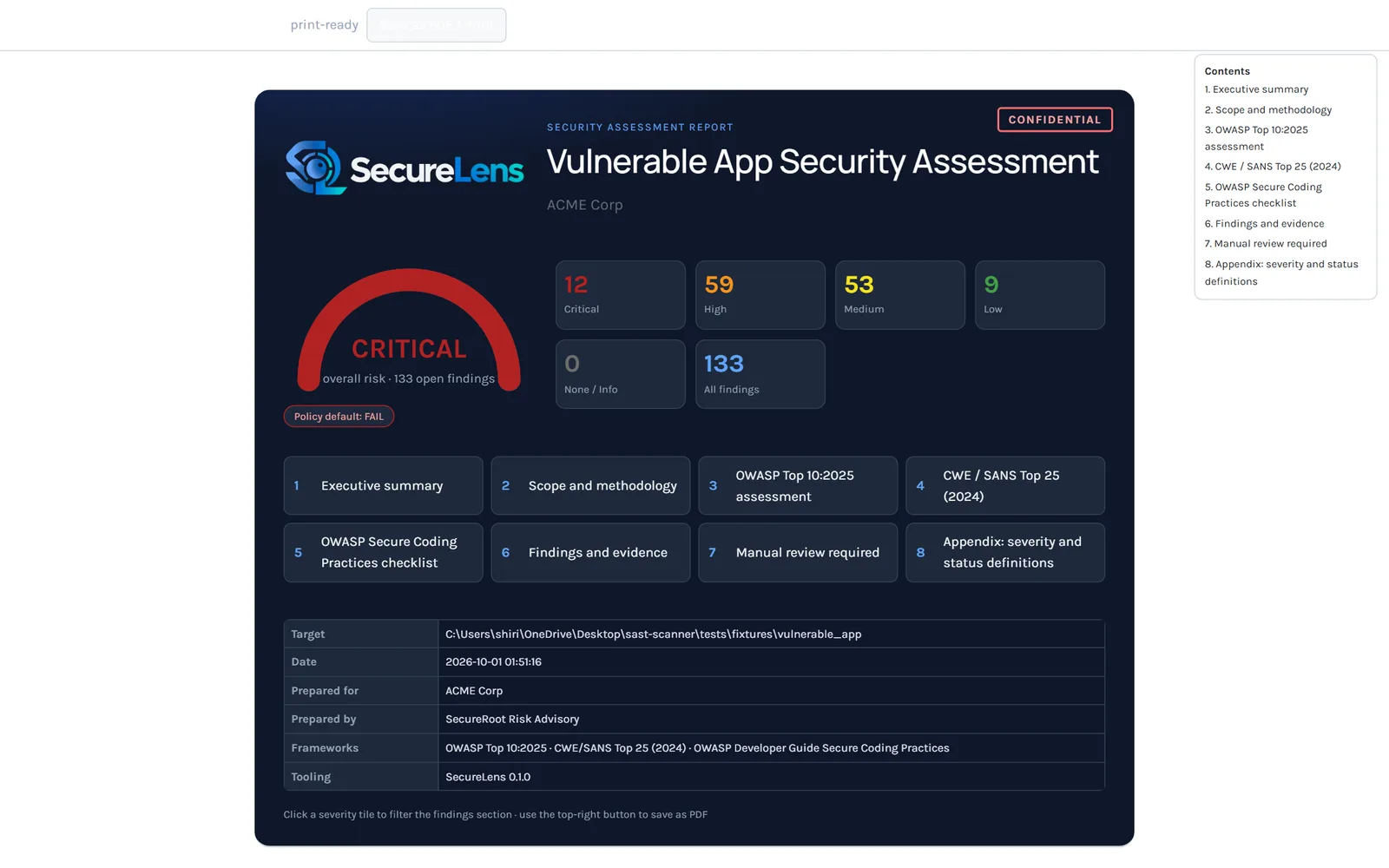
The assessment report's interactive cover: overall risk gauge, severity tiles that filter the findings, and the section cards. Figures are from the bundled vulnerable demo application, not a client. 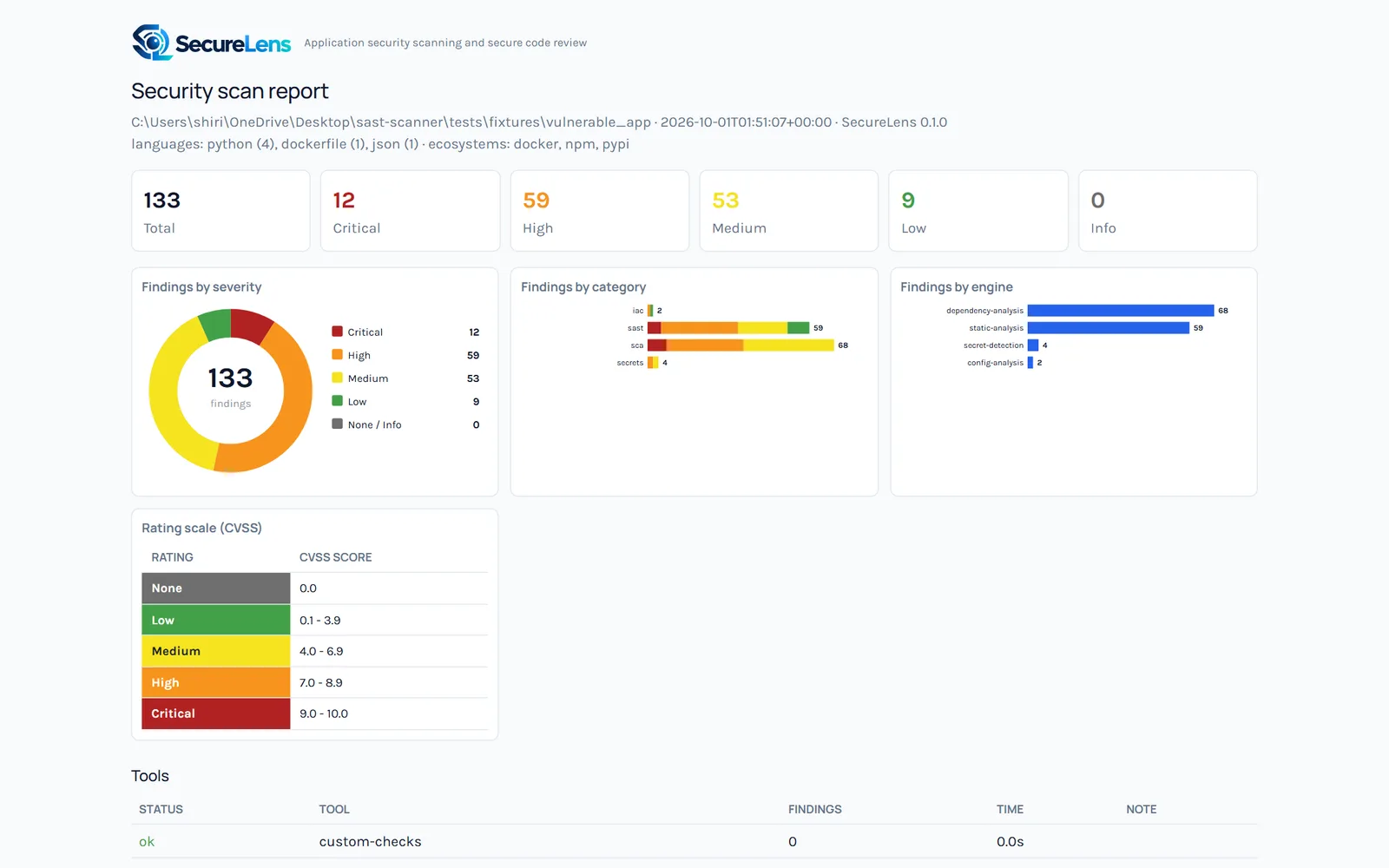
The self-contained HTML findings dashboard: 133 de-duplicated findings by severity, category and engine, keyed to the CVSS rating scale. Same demo fixture.
Who It Is For
Who SecureLens Is For
Teams that need a repeatable secure code review, and consultancies that deliver one.
Engineering teams in regulated firms
A code review gate that PCI DSS requirement 6 and the RBI and SEBI application security expectations can be evidenced against.
Product companies before a pentest
Clearing the mechanical findings before SecureRoot's manual VAPT, so the testers spend their time on the logic flaws a scanner cannot find.
DevSecOps pipelines
SARIF into GitHub Code Scanning, a policy that fails the build, and a baseline so only new findings block a merge.
Security consultancies
White-label assessment reports with your branding, engine names hidden by default, from a binary that needs no Python on the target machine.
Regulatory Mapping
Standards the Review Is Mapped To
SecureLens maps findings to three public standards and gates them against policies written for a fourth. Each row names what the standard covers and what the tool produces for it.
- What it covers
- The ten most consequential web application risk categories, from broken access control and injection to software supply chain failures.
- What SecureLens does
- Every finding is placed in a category through a 218-CWE mapping; the review reports all ten categories, with findings or without, and carries reviewer questions for each.
- What it covers
- The twenty-five most dangerous software weaknesses, ranked, as a benchmark for what a codebase must not contain.
- What SecureLens does
- A table of all twenty-five with the count and worst severity per weakness, alias CWEs rolled up, and a policy option that forbids any Top 25 hit.
- What it covers
- Forty-one practices across input validation, output encoding, authentication, session management, access control, cryptography, error handling and more.
- What SecureLens does
- Twenty-nine items are tested automatically and reported pass or fail with evidence; the remainder are listed for manual review rather than silently marked as passed.
- What it covers
- Secure development, review of bespoke and custom software for vulnerabilities, and protection against the common coding weaknesses before release.
- What SecureLens does
- A built-in PCI policy that fails the scan on critical or high findings, sixteen forbidden weakness classes and any detected secret, and requires that both static and dependency analysis actually ran.
SecureLens is built on open-source engines (OpenGrep, Semgrep, Bandit, Gitleaks, Trivy, Grype, OSV-Scanner, pip-audit and npm audit) plus its own data-flow engine, rule pack and OSV client. Reports hide the engine names by default and show analysis types instead; a flag reveals them.
Plainly Stated
What SecureLens Is Not
It is not a penetration test. A scanner finds the weaknesses a rule or a taint trace can describe; it does not find a broken business rule, a privilege escalation across tenants or an abuse of a correctly implemented feature. SecureRoot's manual VAPT and secure code review services exist for those.
The data-flow engine is Python only, flow-insensitive within a function, and does not track globals or dynamic dispatch. Other languages get taint rules through OpenGrep and Semgrep where those engines can run. Each finding states its limits.
Four of the 41 secure coding checklist items are fully automated as passes in the current release and seven require manual review; the review lists them rather than reporting them as satisfied.
Pricing
Pricing
SecureLens is used inside SecureRoot's secure code review, software composition analysis and DevSecOps engagements, and it is available to teams and consultancies that want to run it themselves. Licensing depends on the number of repositories and users and on whether you want the white-label portal. We put it in writing after a scoping call rather than publish a figure here.
Which languages and package ecosystems does SecureLens scan?
Static analysis covers twenty languages including Python, JavaScript and TypeScript, Java, Kotlin, Go, Ruby, PHP, C#, C and C++, Rust, Scala, Swift, shell, Terraform and Dockerfiles. Dependency analysis reads manifests for PyPI, npm, Go, Maven, RubyGems, Packagist, Cargo, NuGet and Docker. The doctor command lists exactly what applies to a given repository.
Does it need Python or the engines installed on our machines?
No. Each release ships one self-contained executable per platform that bundles the scanner, the rule pack, the portal, the report writers and the Python engines. The installer downloads the external engines from their official releases with checksum verification, and where a binary cannot run, the same scan can run through the official Docker images instead.
How does the CI gate work?
A policy sets what fails the build: severity ceilings, forbidden CWEs or categories, required engines, a cap on new findings since the baseline. Built-in default, strict and PCI policies ship with the tool, and a violation exits with code 1 and prints the reason. A baseline from a previous report suppresses findings you have already seen, so only new ones block a merge.
Will it flood us with duplicates and false positives?
Duplicates are merged: every engine's output is normalised into one finding model with a stable fingerprint, so the same weakness reported twice appears once. False positives are recorded in the triage workbench with a comment and a reviewer, drop out of the rating and the gate, and stay recorded so the decision survives the next scan.
Can we put our own branding on the reports?
Yes. The assessment reports in HTML, PDF and DOCX take a title, organisation, prepared-by line, classification and logo, and the engine names are hidden by default so the report reads as your assessment rather than a tool's output. Consultancies use this to deliver SecureLens output under their own name.
Is a SecureLens scan the same as a SecureRoot secure code review?
No. The scan is the automated half. SecureRoot's secure code review service adds manual review of the logic, the authentication and authorisation design and the items the checklist marks for a human, and the report is signed by the consultant who did that work.
Services
Where It Fits in the Work
The services SecureRoot delivers with SecureLens, read from the catalogue.
- Secure Code Review (SCR)Manual, line-by-line review of your most sensitive code paths, backed by SAST triage.
- Software Composition Analysis (SCA)Know every third-party and open-source dependency you ship, and every risk it carries.
- Web ApplicationManual testing of your web apps against the OWASP WSTG
- APIREST, GraphQL and SOAP testing against the OWASP API Top 10
Ready When You Are
Tell us what is due and who is asking. You will leave the call with a written scope, a timeline and a fixed price, and an honest answer if we are not the right firm for it.